
Cisco CML labs, ready to import and graded when you're done
Ready-made practice labs for Cisco Modeling Labs (CML), covering CCNA and CCNP. Import the .yaml, configure real Cisco IOS yourself, then upload your export and get every failed check named.
Import, configure, grade
- 1Import the .yaml into Cisco Modeling Labs
Every lab ships a ready-made
.yamltopology. No drawing, no cabling — import and the network is standing. - 2Configure it yourself on real Cisco IOS
A written guide states the objective and the requirements. The commands are yours to work out — that is the part that teaches.
- 3Upload your config and get it graded
Your running-config is checked line by line against a withheld rubric. You get a score and the name of every check that failed — not just “wrong”.
Every lab passes automated checks and a review by Alec Gauldin, Principal Network Engineer, before it publishes. How labs are checked →
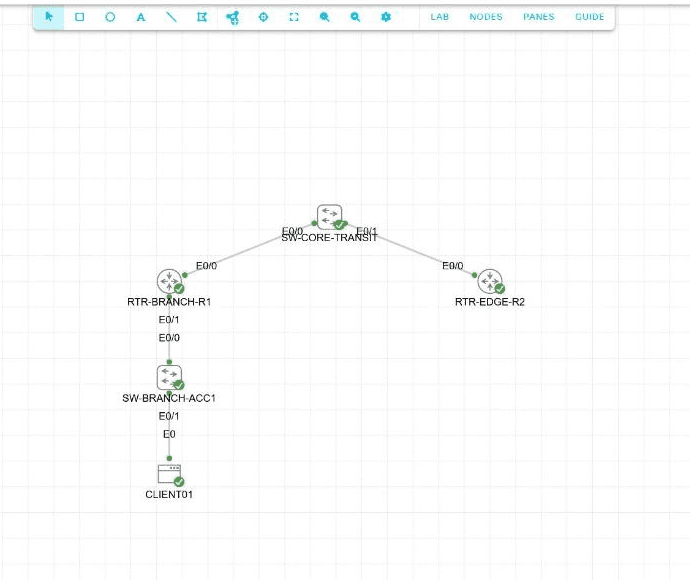
Running them in CML
- CML Free is enough. Every lab fits its five-node limit. Get CML Free
- Install the reference platform ISO. Labs use IOL, IOL-L2 and Alpine; without the ISO, nodes won't boot. Import a lab
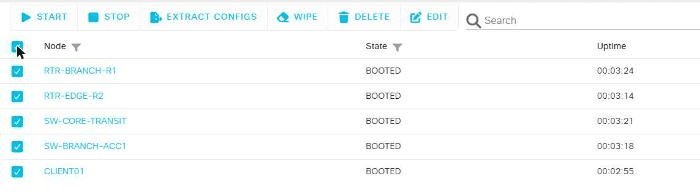
- Extract Configs before you export. Select every node, click Extract Configs, then LAB → Download Lab. Upload that .yaml. Export a CML lab
You already have CML. You don't have a grader.
If you run CML you can draw your own topology — that part is not the bottleneck. The bottleneck is that nothing in CML tells you whether the configuration you just wrote is correct. Devices come up, pings succeed, and a trunk with the wrong native VLAN looks exactly like a trunk with the right one.
Every lab here carries a rubric that stays hidden until you submit. It reads your exported running-configs and reports which checks passed, which failed, and on which device — so “it works” and “it's right” stop being the same answer.
Still choosing a tool? CML vs Packet Tracer.
Upload your config. Get judged, instantly.
A sample result — 4 of 5 requirements met. This is exactly what you see the moment you submit.
lab-export.yaml — read 3 device configs
- Passed: OSPF process 1 enabled on R1
- Passed: Area 0 configured on Gi0/0
- Passed: R2 advertises 10.0.12.0/30
- Passed: Adjacency R1 ↔ R2 reaches FULL
- Failed: default-information originate — missing on R3
Solution revealed — R3
The two lines that clear "default-information originate":
router ospf 1
 default-information originate
Every node you touched, line by line — unlocked the moment you submit.
Recent CML labs
Each ships a ready-made topology, a written guide, and a grading rubric.
- CCNA L3 Switching: Retire the Router-on-a-Stick
- CCNA Break/Fix Capstone: One Floor, Two Layers, One Ticket
- CCNA Break/Fix: The Adjacency That Forms and Never Finishes
- CCNA Break/Fix: Routes Configured, Never Installed
- CCNA Break/Fix: Subnets That Went Dark After Summary Tidy
- CCNA Break/Fix: The Gateway Pair That Only Fails Over by Hand
What you can practice
All CCNA labs (261) · CCNP labs (43) · Troubleshooting labs (72)
Start with the free labs
22 labs are free with an account. No card.
Frequently asked questions
What is a Cisco CML lab?
A CML lab is a topology file you import into Cisco Modeling Labs, which then boots real Cisco IOS images — not a simulation of them. Because it is the genuine operating system, the commands, the output and the failure modes are the ones you meet on production gear.
Will these labs run on CML Free?
Yes. No lab in the published catalogue exceeds five counted nodes, and every one uses only IOL, IOL-L2 and Alpine — all included in the CML-Free reference platform.
How do I import a lab into CML?
Every package contains an imports/lab-work.yaml file. In CML choose Import, select that file, and the topology is created with all devices and cabling in place. There is a step-by-step walkthrough in the guides if it is your first time.
How is CML different from Packet Tracer?
Packet Tracer simulates IOS behaviour; CML runs the actual software. Packet Tracer is lighter and fine for early fundamentals, but it supports a curated subset of commands and occasionally behaves differently from real gear. There is a full comparison in the guides.
What does grading add on top of the topology?
Building the topology was never the hard part — CML does that from the import. The hard part is confirming the configuration you wrote is correct. Upload your finished lab and every device config is checked against a rubric you do not get to see, returning a score and the specific checks that failed.
Are any of these labs free?
Yes. A free account opens 22 full labs — the same topology, guide and grading a subscriber gets. No card.
How does progress work?
Every graded lab counts toward your standing in each domain, and your dashboard suggests labs for the topics you're closest to mastering. Retries are free; your best score stands.
Working toward the CCNA? CCNA labs follows the exam blueprint, the free labs are listed in one place, and the troubleshooting labs include networks that start broken. Pricing is on the pricing page.