
Run your first lab in Cisco Modeling Labs
Every lab imports straight into Cisco Modeling Labs and runs on the free tier. About an hour to set up, once. Still choosing a simulator? See the lab setup series.
Start with the free CLI-basics lab
Configure one router from scratch and ping a PC. Free, ungraded, no account. Every other lab assumes you can do this.
What you'll need (all free)
Cisco Modeling Labs — the lab engine
CML is a free virtual appliance — a VM image, not a desktop app. CML Free covers up to 5 nodes — every lab here fits inside it.
CML Free is free, but it is not anonymous: you need a free Cisco account to reach the download.
First-time setup includes installing Cisco's reference platform images. Our labs use iol-xe, ioll2-xe, and alpine — without those images installed, imported nodes won't start.
A hypervisor to run it on
CML is an appliance, so it needs a hypervisor. Use VMware Workstation (Windows/Linux) or Fusion (Mac) — free for personal use, and the only supported host for CML. VirtualBox will not run CML.
On an Apple Silicon Mac the x86 Cisco images can't virtualize natively — run CML in the cloud or a Cisco DevNet Sandbox instead (the home-lab hardware guide covers it), or grade a config in your browser.
A guide viewer — optional
Every lab ships a PDF you can open anywhere, so no editor is needed. Prefer Markdown? Open the lab folder in Obsidian or VS Code.
Will it run on my machine?
RAM, CPU and disk — and what to do if it won't.
CML boots a small virtual machine for every device, so RAM is the real limit. Plan on 16 GB — 8 GB of it free. You also need a couple of free CPU cores, hardware virtualization (Intel VT-x / AMD-V), and roughly 20 GB of free disk. An SSD keeps boot times sane.
From download to a graded lab, step by step
Jump to any step, or work top to bottom.
Deploy Cisco Modeling Labs
CML is a virtual appliance, not a desktop app. Import the
.ovainto VMware Workstation or Fusion, or install the.isoon a dedicated machine, then boot it and sign in to its web dashboard. Install Cisco's reference platform images during setup — they are a second, separate download, and without them an imported lab's nodes have no image and will not start.Download a lab from Goldfish Networks
Create a free account — the first lab of every bundle is free, and so is the sample lab. A subscription adds the daily lab, the whole daily back catalogue and every lab in every bundle. Either way you get a single
.zip.Unzip the package
Extract the
.zipand openSTART-HERE.pdf— it covers setup, import and submission end to end. The CML import files, guides and topology diagram are in the folders beside it (layout below).Import the topology into CML
In the CML dashboard choose Import, select
imports/lab-work.yaml, then Start the lab. The devices boot with their starting configuration already applied — your job is to complete the objectives.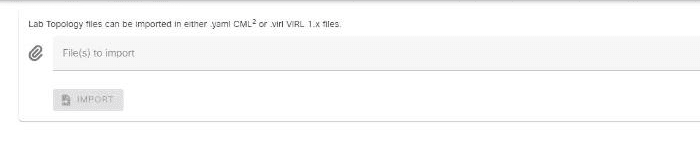
Dashboard → Import, then choose imports/lab-work.yaml from the unzipped package. Work the lab
Follow
guides/lab-guide.pdfand configure the devices to meet the objectives.Extract your configs, then export
Before you export, open the Nodes toolbar in CML, select all nodes, and click Extract Configs — without it the export carries the starter config, not your work, and scores 0. Then export the lab and upload it on the lab's page. Graded labs reveal the node-by-node solution once you submit.
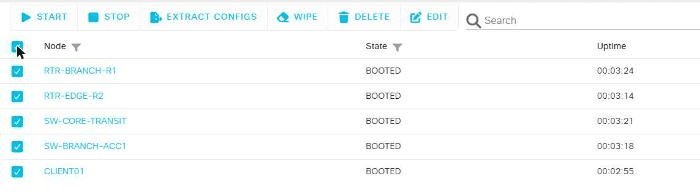
Select all nodes, then Extract Configs — skip this and the export carries the starter config, not your work. 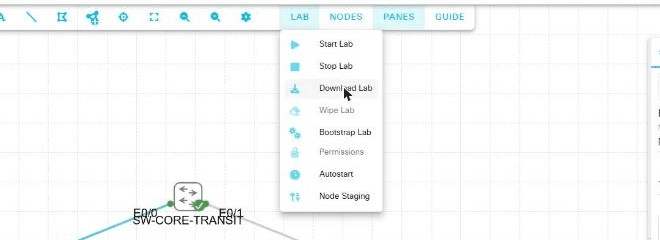
LAB → Download Lab, once configs are extracted — the YAML it saves is what you upload for grading.
What's in the download
Every lab package has the same layout.
START-HERE.pdfSetup, import, and how to submit — read this first
imports/lab-work.yamlImport this into CML to start the lab
guides/lab-guide.pdfBranded guide — open in any PDF viewer (Adobe, Preview, browser)lab-guide.mdThe same guide in Markdown — import into Obsidian or VS Code
diagrams/topology.pdfThe network diagram
LICENSE.txtLicense terms for the package
Graded labs reveal the solved configs once you submit, and the written solution guide once you pass; other labs also include imports/lab-solution.yaml and guides/solution-guide.md in the download.
Ready to build something?
Download the free sample, build it, grade it. Then pick from the ready-made CML labs.
Every setup guide, in order
Choose a simulator
Get the software
Hypervisor and hardware
- VMware Workstation for Cisco Labs (Now Free for Personal Use)
- VirtualBox for Network Labs: Free Virtualization for EVE-NG & GNS3
- Proxmox VE for Network Labs: A Free Home-Lab Server for CML, EVE-NG & GNS3
- Cisco DevNet Sandbox: Free Cisco Labs in the Cloud
- The Best Home Lab Setup for CCNA (Hardware, RAM & Options)
Connect to devices
Run and save labs
Cisco, Cisco Modeling Labs, and CML are trademarks of Cisco Systems, Inc. Goldfish Networks is not affiliated with or endorsed by Cisco; we publish independent practice labs that import into CML.